


Bond Home
4.71.12K Reviews
App Specs
- Version
- 2.64.3-master1
- Updated On
- License
- Free
- Downloads
- 100,000+
- Developer
- Olibra LLC
- Categories
- House & Home
- Platform
- Android
Screenshots
 Analysis by AppCompare
My interest in Bond Home starts with a familiar home problem: useful appliances that still depend on their original remotes. A ceiling fan, fireplace, or shade may work perfectly well, yet controlling it from across the room—or remembering to switch it off before leaving—can feel needlessly clumsy. Bond Home is designed to bring compatible existing devices into a more connected routine, rather than asking you to replace them. I see that as its clearest appeal: it tries to make everyday controls easier without turning a small convenience project into a full renovation.
Who benefits from bringing old controls into a routine?
This is a House & Home app from Olibra LLC, and the idea suits people whose homes already contain remote-controlled equipment they want to manage more conveniently. If you use a fan in a bedroom, a shade in a bright living room, or a fireplace that you would like to operate without searching for its remote, the app’s focus is easy to understand. Its usefulness depends on the devices and setup you have, so I would begin by identifying the exact appliance and its current control method before planning a whole-home system around it.
That distinction matters when comparing Bond Home with the usual alternatives. A person buying a new smart appliance may be better served by that appliance’s own app, while someone replacing switches or wiring may need a different kind of home-control solution. Bond Home is more appealing when the aim is to keep existing equipment and add a connected layer around it. It is not a reason to assume every fan, fireplace, or shade will work; checking compatibility for your particular setup should come before investing in any associated hardware.
Starting with one device makes the setup easier to judge
The safest way to approach the app is as a small trial, not a promise to automate every room at once. Pick one device you already use regularly and decide what would genuinely improve its control. For example, a bedroom fan is a practical first candidate because you can test ordinary commands at home and see whether the app fits your habits. That first test also helps reveal whether the device’s existing remote and the new controls make sense together.
Bond Home is free to download, and its Everyone age rating makes it broadly suitable for household use. It has a 4.7 average from around 2,100 ratings, with over 100,000 installs. Those figures suggest that many people have tried it, but I would treat them as background rather than a guarantee that it will suit a particular home. Compatibility and the value of the workflow matter more than popularity when the goal is to control a specific appliance.
Once you have chosen a suitable starting device, the useful question is not simply whether it can be added; it is whether the app can take over a task you currently perform often enough to notice. If a remote is already always beside your chair, the improvement may be modest. If it gets misplaced or the device is awkward to reach, app-based access may feel much more worthwhile. Thinking about that difference helps avoid adding connected controls just because they are available.
From Setup to an Everyday Result
I start with one familiar appliance and a specific annoyance, such as a fan remote that is always out of reach. That gives me a practical way to judge whether connecting it improves the routine rather than adding another control for its own sake. From there, I look at how the app, schedules, and any household handoffs fit together—and where a simpler option may still work better.
Worth Reading Before You Choose

EA SPORTS FC Mobile 26 Is a Bigger Football Game, but It Takes Time

Flipboard Shows What News Apps Must Do Beyond the Feed

Switching to Android Auto Means Rethinking Your Driving Routine

Google Calendar Makes a Crowded Week Easier to Manage

Ludo King Makes the Most of the Minutes Between Plans

Baby Panda World Brings Quick Play to Modern Phones, but Its Game Library Feels Busy
Getting Started with Bond Home
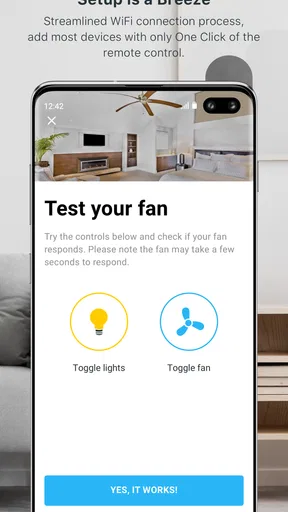
So, you’ve got your Bond Home device, and you’re ready to dive into the world of smart home automation. The first thing you’ll notice is how easy the setup process is. Simply download the app from the App Store or Google Play, and you’re pretty much halfway there. The app guides you through each step with clear and concise instructions. It’s as if they knew exactly what questions you’d have and answered them before you even asked!
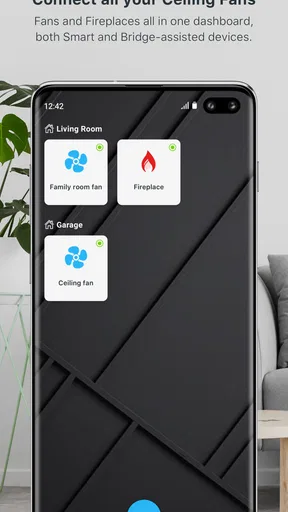
The app’s interface is clean and intuitive. Everything you need is right there at your fingertips. The main screen gives you an overview of all the devices you’ve connected, and adding new ones is a breeze. Just tap the plus sign, follow the prompts, and voilà! Your old-school devices are now in the 21st century.
Features That Stand Out
Now, let’s talk features. What makes Bond Home stand out from the crowd? First off, it supports a wide range of devices. Whether you’re looking to control your ceiling fan, fireplace, or shades, Bond has got you covered. And the best part? No need to replace any of your existing hardware. It’s all about making what you already have work smarter.
Another feature that I found particularly useful is the ability to set schedules. You can program your devices to turn on or off at specific times of the day. Imagine waking up to the gentle breeze of your fan or coming home to a cozy, pre-lit fireplace. It’s the little things that make life more comfortable, right?
Schedules are most useful when they match a stable habit, rather than trying to predict a day that changes constantly. A fan that you usually want on before bedtime is a clearer scheduling candidate than a device you operate only when the weather or your plans call for it. I would start with one simple routine, then check whether it behaves the way you expect before relying on it. That keeps automation helpful without making you wonder whether a setting will conflict with what you want in the moment.
For those concerned about compatibility, the app integrates seamlessly with Amazon Alexa, Google Assistant, and even SmartThings. This means you can control your devices with just your voice or through other smart home systems you might already be using.
Handing control from the app to the rest of the home
Voice assistants and a broader smart-home system can be useful handoffs, but I would add them only after direct app control feels dependable. First confirm that the appliance responds as you expect from Bond Home itself; then connect the control method you actually use. This order makes troubleshooting less confusing. If a voice command fails, you can distinguish a problem with the appliance connection from one in the assistant or its setup, rather than changing several things at once.
A realistic evening routine shows where those handoffs can help. You might use the app to check a fan before bed, rely on a schedule for a regular morning start, and use a voice assistant when your phone is out of reach. Each route has a different strength: the app gives you a direct place to manage connected devices, a schedule handles a predictable task, and voice control is convenient when your hands are occupied. Keeping those roles simple makes the setup easier for other people at home to understand, too.
There is a trade-off in having several ways to control one appliance. A remote may remain the quickest choice for someone standing nearby, while the app is useful when the phone is already in hand and a voice assistant can help from elsewhere in the room. I would not remove a familiar control from the routine just to make the home feel more automated. Let each option solve a real inconvenience, and keep the ordinary fallback clear for guests or household members who do not use the app.
User Experience and Performance
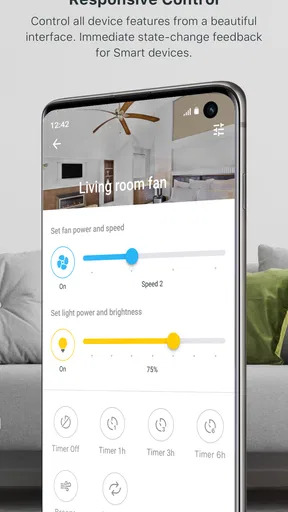
In terms of user experience, Bond Home is pretty solid. The app is responsive, and I rarely encountered any hiccups or delays. It’s clear that a lot of thought went into ensuring everything runs smoothly. The learning curve is minimal, and even if you’re not the most tech-savvy person, you’ll find it user-friendly.
As far as performance goes, the devices respond almost instantly to commands from the app. Whether you’re at home or halfway across the world, you have full control over your connected devices. I tested this out while away for a weekend, and it was comforting to know I could manage everything remotely.
Remote control is most valuable when it answers a specific question, not merely because it is possible. Before leaving for a trip, for instance, it can be reassuring to have a way to manage connected equipment if your plans change. For an everyday user, though, I would test remote access before depending on it for an important routine. A quick check at home and a separate low-stakes test while away are sensible ways to learn how the setup behaves in your own circumstances.
For a household with several devices, I would also add them in a deliberate order and give each one a name that is obvious to everyone who may use it. Clear names reduce the chance of choosing the wrong control when several similar appliances appear together. This is a small organizational habit, but it becomes more valuable as the device list grows. It also makes voice commands easier to think through if you later use an assistant.
Bond Home runs on Android from version 7.0, and its current version is 2.64.2-master1. That makes it worth checking the software requirements on the phone you plan to use before making the app part of a household routine. If more than one person will manage the same devices, agree on who sets schedules and how changes are communicated. A little coordination can prevent a useful automation from surprising someone who expected to use the appliance another way.
Security and Privacy
Let’s not forget about security. In today’s digital age, privacy is a big concern, and rightly so. The Bond Home app takes this seriously. It uses encryption to protect your data and ensure that your smart home remains secure. I felt confident knowing that my information wasn’t being compromised.
Even when an app is intended for ordinary household controls, I think it is sensible to keep the connected setup limited to devices and people who need access. If you share a home, explain which appliances are connected and what schedules are active, particularly for equipment such as a fireplace. Automation should make a routine easier to manage, not leave someone guessing why a device has changed state. Keeping the manual control familiar is also a practical fallback if a phone is unavailable.
Where the convenience can fall short
The main limitation is that a connected-control app cannot make an incompatible appliance compatible by itself. Bond Home’s central promise is most compelling when your existing devices fit the system and you are comfortable using an additional layer of control. If your equipment has no suitable remote-based control, or if you want to replace it with a fully integrated smart appliance, another route may be more straightforward. I would verify the fit before building a shopping list or assuming every device in a room can join.
There is also a habit cost. If you prefer physical buttons, do not carry your phone around the home, or want family members to operate equipment without learning an app, a traditional remote may remain the better everyday tool. Likewise, people who want one app to manage a wide range of unrelated smart-home products should compare how well their existing system handles that broader job. Bond Home’s specific focus can be a strength for certain devices, but it is not automatically a universal home dashboard.
Schedules deserve a little restraint, too. They work best for predictable patterns, but a fixed on-or-off time may be inconvenient when your routine changes. I would use them for repeatable comfort rather than treating them as a substitute for judgment. For appliances that need attention based on the moment, direct control is often the more sensible option. This is one reason to start with a single schedule and keep checking that it still suits the household.
Final Thoughts
All in all, the Bond Home app offers a fantastic way to bring smart home capabilities to your existing devices. It’s easy to use, packed with features, and integrates well with other smart home platforms. If you’ve been on the fence about diving into home automation, this might just be the perfect starting point.
So, if you’re looking to up your smart home game without breaking the bank or doing a major overhaul, give Bond Home a try. It’s a small investment for a big step into the future.
My recommendation is to approach it as a targeted convenience tool: choose one compatible appliance, test direct control, and then add a schedule or assistant connection only if it improves a routine you actually have. That approach suits people who want to extend the life and usefulness of existing fans, fireplaces, or shades. If you are shopping for new equipment, need a broader control system, or value physical controls above phone-based access, compare those options first. When the fit is right, Bond Home can turn an old remote-dependent task into a more flexible part of the day without asking you to rebuild the room around it.
Pros
- Intuitive user interface design.
- Seamless integration with smart devices.
- Reliable real-time notifications.
- Customizable home automation rules.
- Energy usage tracking capabilities.
Cons
- Limited compatibility with older devices.
- Occasional connectivity issues reported.
- Subscription required for premium features.
- Complex setup process for beginners.
- No offline mode available.
FAQs for Bond Home
What is Bond Home and how does it work?
Bond Home is a smart home automation app that allows you to control various devices like ceiling fans, fireplaces, and shades from your smartphone. By connecting to Bond's smart hub, the app communicates with devices using Wi-Fi, enabling you to manage your home environment conveniently from anywhere.
Which devices are compatible with Bond Home?
Bond Home is compatible with a wide range of devices, including ceiling fans, fireplaces, and motorized shades that use RF or IR remote controls. Before purchasing, ensure your devices are supported by checking the compatibility list on the Bond Home website or within the app's support section.
Is there a subscription fee for using Bond Home?
No, Bond Home does not require a subscription fee. After purchasing the Bond hub, you can use the app and its features without any additional charges. This makes it a cost-effective solution for smart home enthusiasts looking to enhance their home automation experience.
How secure is Bond Home in terms of privacy and data protection?
Bond Home prioritizes user privacy and data protection. The app uses encryption to secure data transmission between your devices and the Bond hub. Additionally, the company adheres to strict privacy policies to ensure your personal information and usage data are kept safe and confidential.
Can I integrate Bond Home with other smart home systems?
Yes, Bond Home can be integrated with other smart home systems such as Amazon Alexa and Google Assistant. This allows you to use voice commands to control your devices, providing a seamless and hands-free smart home experience. Check the app for detailed setup instructions.


